
Stop wasting time optimizing images one by one. Discover the all-in-one desktop tool that handles bulk compression, conversion, resizing, and precise geotagging with ease.
For Windows 10/11
What is Xuan Image Tool (Xtool) v2.0?
Xuan Image Tool (Xtool) is a powerful, free desktop application designed for photographers, marketers, and developers who need to process images in large batches. Whether you’re preparing photos for a website, optimizing your portfolio, or adding crucial location data for SEO, Xtool streamlines the entire process into a simple, intuitive interface.
Version 2.0 has been completely overhauled for stability, adding powerful new features and a user-friendly, Excel-style grid for lightning-fast editing.
Core Features That Save You Time
Powerful Bulk Image Processing
Don’t just process one image at a time. Load an entire folder and apply changes to hundreds of photos instantly.
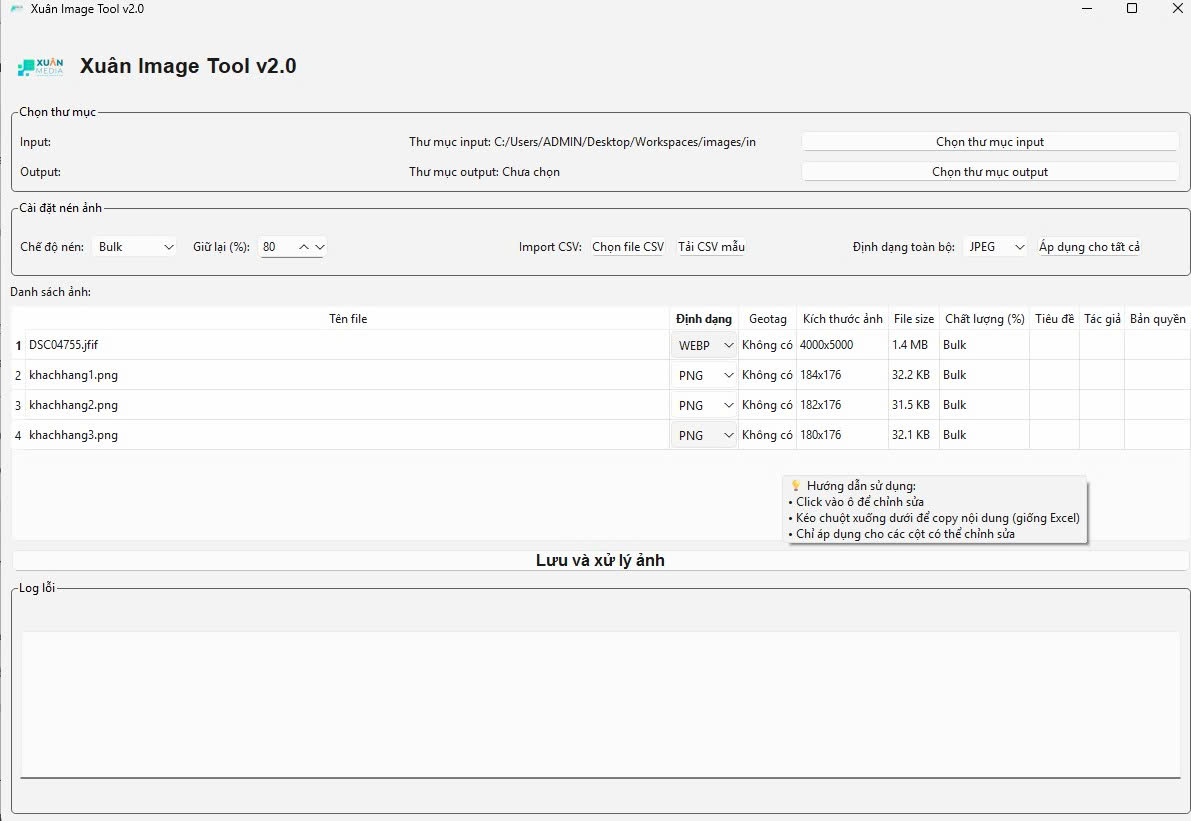
- Bulk Compress: Drastically reduce file sizes while maintaining high quality. Choose a “Bulk” quality (e.g., 80%) for all images or set quality “Individually”.
- Batch Convert: Convert entire folders between 12+ formats, including
JPEG,PNG,WEBP,BMP, andTIFF. - Batch Resize: Set new dimensions (e.g.,
1920x1080) using the high-quality LANCZOS algorithm for sharp, professional results.
Advanced Geotagging
Boost your local SEO and organize your photos by adding precise GPS coordinates. Xtool v2.0 writes geotags directly into the image’s EXIF data for maximum compatibility.
- Simple Format: Just enter coordinates as
latitude, longitude(e.g.,21.0285, 105.8542). - Auto-Verification: The tool automatically verifies the data is saved correctly.
- Supported Formats: Works perfectly with
JPEG,TIFF, andWEBP.
Full Metadata Control
Add or edit crucial information to protect your work and improve its searchability.
- Title: Add a descriptive title (e.g., “Hoan Kiem Lake at Sunset”).
- Author: Embed your name or brand.
- Copyright: Protect your images with a copyright notice.
Intuitive & Improved Interface
- Excel-Style Drag & Drop: Edit one cell, then drag the corner to copy that data to multiple rows—just like in Excel!
- Import/Export CSV: Manage all your metadata externally in a CSV file and import it in one click.
- Smart Tooltips: Hover over any setting for a clear explanation.
How to Use Xtool in 5 Simple Steps
- Step 1: Run
XTool.exe(no installation required). - Step 2: Select your Input Folder (where your original photos are) and Output Folder (where the new photos will be saved).
- Step 3: Choose your compression mode (“Bulk” or “Individual”).
- Step 4: Edit any information directly in the grid. Change formats, add geotags, or edit titles. Use the drag-and-drop feature to apply changes quickly.
- Step 5: Click “Save and Process Images” and let Xtool do all the heavy lifting!
Important Note on EXIF Data
Geotagging and Metadata (Title, Author, Copyright) are saved to the image’s EXIF data. This is fully supported by formats like JPEG, TIFF, and WEBP.
Formats like PNG, BMP, and GIF do not support EXIF data. If you need to add this information, make sure to convert your images to a compatible format (like JPEG) first.
Get Your Free Image Optimizer Today
Stop the repetitive manual work and start optimizing your image workflow. Download Xuan Image Tool v2.0 and see the difference.

Newest Posts
Batch Image Watermarker Offline No Upload Free
Have you ever spent hours doing something so repetitive that you felt
Nov
How to Convert JSON to Objects in JS, PHP & Python?
In the landscape of modern software engineering, data is the universal currency.
Nov
How to Create a QR Code Online Free While Ensuring Privacy and Professional Quality?
The User’s Question (The Expert’s Challenge) “I need a free, fast, and
Nov
How to Format, Convert, and Master JSON Online?
Learn how to format JSON, convert CSV to JSON, and fix syntax
Nov
How to Create Secret Messages to Prank Your Friends (Morse, Binary & Caesar Cipher)
Have you ever wanted to say something without everyone understanding it? Maybe
Nov
The Ultimate Plugin Floating Contact Button WordPress: Simple, Clean & Lightweight
Are you tired of searching for a plugin Floating Contact Button WordPress
Nov
Simplify Your Day: Meet the Ultimate App Todo List Free Online
Are you tired of productivity tools that feel more like a burden
Nov
Admin Pretty Plugin: A Clean, Secure Dashboard Makeover
After years of managing WordPress sites, have you noticed how the admin
Nov